
SuSy Community
Accelerated impact, reduced complexity
SuSy Community comes ready with best-practice workflows for Australian community services, powered by Salesforce Nonprofit Cloud and shaped by AlphaSys expertise. Your team can start managing enquiries, intake, and cases from day one. The foundation keeps scope clear, risk low, and momentum steady.
quick links to features
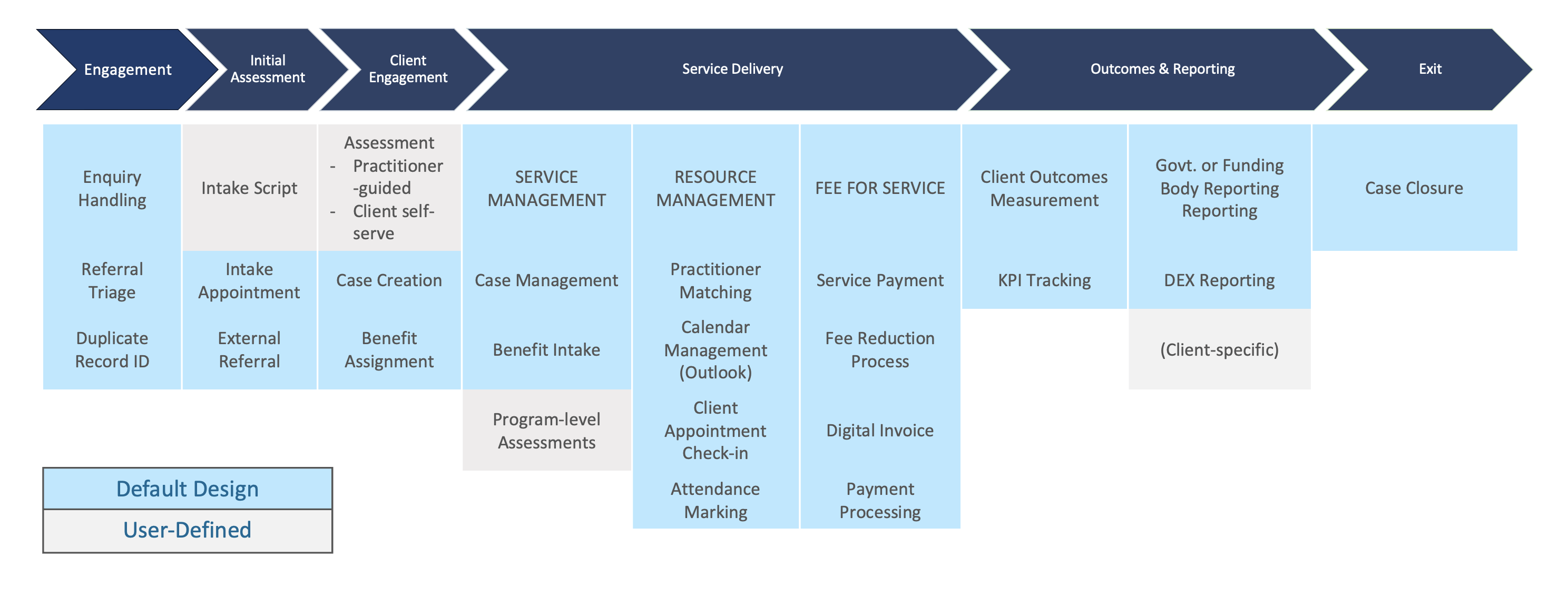
Featureset
What is included
- Core data model for clients, referrals, programs, service delivery, and outcomes
- Standard flows for enquiry, intake, assessment, case work, and closure
- Prebuilt dashboards for caseloads, demand, risk, capacity, and outcomes
- Role-based screens for frontline, program leads, and executives
- Data migration templates, validation rules, and duplicate checks
- Training sessions, user guides, and a go-live support plan
How deployment works
- Discovery focused on goals, scope, and data readiness
- Configuration of the SuSy foundation using a configuration-first approach
- Iterative playbacks with real data in a safe environment
- User familiarisation and role-based training
- Cutover planning, supported go-live, and a clear hypercare window
Typical timelines
Most organisations reach a working foundation in about four months, depending on data readiness and scope certainty.
What you achieve at go-live
- Teams confidently using enquiry, intake, and case workflows
- Live dashboards that surface risk and outcomes
- Clean, structured data that supports reporting and funding conversations
After go-live
Continue with managed services for enhancements, new integrations, and continuous improvement without disruptive rebuilds.
Engagement
Every enquiry in one flow.
Log web, phone, inbox, and walk ins, check for duplicates, and move to intake.
Key benefits
- All channels in a single workflow
- Duplicate checks as you go
- Simple handoff to triage
How it works
- Capture the enquiry
- Check for existing records
- Create a referral and next steps
What you achieve
- Fewer missed enquiries and faster follow up
Stop duplicates before they spread.
Detect potential matches and keep a single, clean record of truth.
Key benefits
- Fuzzy matching on names and key fields
- Guided merge for admins
- Cleaner reports and fewer mistakes
How it works
- System flags potential duplicates in context
- Review and choose the master
- Preserve the right data on merge
What you achieve
- Trustworthy client and organisation data
Initial Assessment
Guided questions for consistent intake.
Follow a friendly script that captures the essentials and reduces rework.
Key benefits
- Consistent questions for every client
- Helpful prompts and validation
- Reduced back and forth later
How it works
- Launch the intake script from the referral
- Capture demographics, context, and safety notes
- Save once and carry forward to the case
What you achieve
- Complete, usable intake records from day one
Book the first conversation quickly.
Schedule intake, send confirmations, and carry details into the case.
Key benefits
- Skills and location matching
- SMS and email confirmations
- Calendar sync for practitioners
How it works
- Check availability and book
- Send confirmation and reminders
- Move captured details into the case
What you achieve
Fewer no-shows and a smoother first session
Guide clients to support beyond your walls.
Record why the referral is needed and share details with trusted external providers.
Key benefits
- Clear reason and context
- Contact details for providers
- Follow up tasks where needed
How it works
- Record the need
- Select the provider
- Send and track the referral
What you achieve
- A supported handover clients can rely on
Client Engagement
Turn referrals into active support.
Create cases with the right participants and context in one step.
Key benefits
- One click from referral to case
- Participants and relationships carried across
- Clear starting checklist for staff
How it works
- Review referral
- Convert to case with participants
- Start the case plan
What you achieve
- Faster start to meaningful client work
Match clients to the right support.
From a case, assign one or more benefits and track progress in one place.
Key benefits
- Assign benefits from the case
- See locations and capacity
- Clear status from intake to delivery
How it works
- Pick the participant
- Choose the benefit and location
- Track intake and service steps
What you achieve
A single view of who is getting what support
Service Delivery
See every service in motion.
Set up services, track capacity, and manage delivery across sites.
Key benefits
- Service definitions and locations
- Capacity and waitlist visibility
- Consistent service rules
How it works
- Configure program services
- Monitor capacity and waitlists
- Review delivery and outcomes
What you achieve
Better planning and fewer bottlenecks
Keep client work on track.
Plan goals, record notes, manage tasks, and see progress at a glance.
Key benefits
- Case plans and milestones
- Role based notes and tasks
- Timelines that show change over time
How it works
- Set goals and plan activities
- Capture sessions and notes
- Review progress and adjust
What you achieve
- Consistent practice and clear outcomes
Get the details you need.
When a benefit requires intake, SuSy launches the correct form and saves it back to the case.
Key benefits
- Right form for each benefit
- Practitioner guided or client self complete
- Records stored against the case
How it works
- Check if intake is required
- Launch the mapped form
- Save results and move to delivery
What you achieve
- Consistent assessments with less admin
Get the details you need.
When a benefit requires intake, SuSy launches the correct form and saves it back to the case.
Key benefits
- Right form for each benefit
- Practitioner guided or client self complete
- Records stored against the case
How it works
- Check if intake is required
- Launch the mapped form
- Save results and move to delivery
What you achieve
- Consistent assessments with less admin
Match clients to the right practitioner.
Filter by skills, location, preferences, and availability to book with confidence.
Key benefits
- Skills based and location aware matching
- Client preferences where applicable
- Quick view of earliest suitable slots
How it works
- Select service and filters
- View compatible practitioners
- Book and confirm
What you achieve
- Better fit and stronger engagement
Clarity on who is free and when.
View practitioner availability, follow booking rules, and sync confirmed slots to Outlook.
Key benefits
- Team availability in one view
- Booking rules by service and site
- Outlook sync after confirmation
How it works
- Review calendars
- Book to rules
- Sync and notify
What you achieve
- Fewer clashes and a smoother day
Know who arrived and who needs a call.
Track arrivals for in person and remote sessions, mark no shows, and trigger follow up.
Key benefits
- Reception check in for on site
- Practitioner prompts for remote
- No show tracking and follow up
How it works
- Confirm arrival or attendance
- Notify the practitioner
- Flag no shows and create tasks
What you achieve
Better client experience and clear records
Keep clients informed and engaged.
Use reminders and updates to lift attendance and reduce no shows.
Key benefits
- Timed reminders by SMS or email
- Clear instructions for sessions
- Logs for audit and follow up
How it works
- Book the session
- Schedule reminders
- Track delivery and responses
What you achieve
- Higher attendance and fewer gaps
Set fair fees by service.
Apply fee rules by program or service so billing stays consistent.
Key benefits
- Fee schedules by service
- Concessions and eligibility rules
- Clear audit trail
How it works
- Define fee rules
- Apply at booking or payment
- Report on fees by program
What you achieve
Consistent charging and fewer disputes
Simpler ways to take payment.
Handle front desk, third party, or digital invoices and keep records tidy for finance.
Key benefits
- Walk up payments
- Third party and invoiced payments
- Clear reconciliation and reporting
How it works
- Choose payment path
- Record and receipt
- Reconcile with finance
What you achieve
- Less chasing and fewer errors
Make services accessible when money is tight.
Capture hardship requests, route for approval, and apply the right fee to the right service.
Key benefits
- Simple request and evidence capture
- Clear approval path
- Automatic fee updates where approved
How it works
- Record the request
- Route for approval
- Apply to the relevant service
What you achieve
Fair access that is easy to administer
Send invoices without the hassle of paperwork.
Generate and deliver invoices digitally with a clear audit trail.
Key benefits
- Invoice from the case or service
- Email delivery with status tracking
- Clean handoff to finance
How it works
- Raise the invoice
- Send digitally
- Track payment status
What you achieve
- Faster collections and fewer errors
Take payments in the way clients prefer.
Support front desk, third party, and online payments with simple reconciliation.
Key benefits
- Multiple payment methods
- Clear receipts and refunds
- Audit-ready payment records
How it works
- Take payment in person or online
- Record against the case or invoice
- Reconcile and report
What you achieve
Smooth payments and tidy records
Outcomes and Reporting
Show progress with real data.
Capture outcomes and link assessments to changes over time.
Key benefits
- Standard indicators by program
- Auto calculation from assessments
- Trend dashboards and exports
How it works
- Define indicators
- Link to assessments and services
- Track progress over the client journey
What you achieve
Evidence for practice, funders, and boards
Know if you are on track.
Set targets, monitor trends, and surface issues early with live KPIs.
Key benefits
- Targets by program and site
- Spot early warning flags
- Board ready dashboards
How it works
- Choose the metrics that matter
- Set targets and thresholds
- Review trends and act early
What you achieve
- Fewer surprises and better decisions
Report once, report right.
Use templates and exports aligned to funder needs with data you can trust.
Key benefits
- Standard templates for common needs
- Clean exports and audit support
- Fewer end of quarter scrambles
How it works
- Capture standard fields in daily work
- Review data quality checks
- Export and submit
What you achieve
- Accurate, timely reporting
Keep funding data up to date.
Capture client and session details in SuSy and send to DEX without end-of-month rush.
Key benefits
- Data captured in daily work
- Checks before submission
- Fewer manual extracts
How it works
- Record standard data points as you go
- Validate with built in checks
- Submit on schedule
What you achieve
- Accurate reporting and less scramble
Exit
Close the case when work is done.
After services end, SuSy monitors and closes the case on schedule with a clear record.
Key benefits
- Closure reasons and dates captured
- Automatic closure after service completion
- Readable summary for audit
How it works
- Close all services
- System monitors waiting period
- Case closes with documentation
What you achieve
Clean records and fewer reopen requests
FAQ
Absolutely. The foundation is designed to be configured. We use fields, page layouts, flows, and permission sets to match your programs while keeping upgrades simple.
SuSy provides dashboards for caseload, demand, outcomes, and program performance, plus report templates you can adapt.
All changes are tested in non-production environments, documented, and scheduled in agreed windows. Rollback steps are defined before deployment.
Connect with us
Join other purpose-led organisations choosing sustainable systems for social good.
GPO Box 926
Sydney NSW 2001
Australia
[email protected]
+61 2 8203 1700
Find and follow us on LinkedIn